Can you download the slot as a standalone app?
Dragon Gaming does not release separate APK files or apps on the App Store / Google Play for its slots. It's a deliberate decision: the provider's entire catalogue runs on HTML5, which needs no install and launches directly in the browser.
Any file called "Piggy Bank Bonanza APK" online is either a useless file or malware disguised as the game. The original slot with 95.53% RTP, a certified RNG and real payouts is available only through licensed casinos.
How to properly play Piggy Bank Bonanza on mobile
There are two equal ways. Both give full access to every feature: Hold and Win, Buy Bonus, Nudging Wild, Autoplay — nothing is cut back compared to desktop.
The simplest way. Open the browser on your phone, go to the casino site, find Piggy Bank Bonanza and click "Play". The slot loads in 3–5 seconds on 4G and 1–2 seconds on Wi-Fi.
- Open Chrome
- Go to the casino site
- Log in or register
- Find Piggy Bank Bonanza in the slot search
- Click "Play" — the slot launches
- Open Safari
- Go to the casino site
- Log in or register
- Find Piggy Bank Bonanza
- Click "Play" — everything works

- No install — saves phone storage
- Always the latest version — no app updates needed
- Works on any device — Android 8+, iOS 13+, any browser
A number of big casinos offer their own mobile apps on the App Store and Google Play. If a casino from our ranking has an official app, Piggy Bank Bonanza will be available in it.
Important: you download the casino app, not the slot. Dragon Gaming has no separate app — the slot loads inside the casino app just like in the browser.
- Look for the app only on the official App Store or Google Play — no third-party links
- Check that the app developer matches the casino name
- Official casino apps are free — no download fees
How to make an "app" yourself in 10 seconds
Want the slot icon right on your home screen with no download? Browsers can do it — it's called a PWA (Progressive Web App). It works on both platforms:
- Open the casino site in Chrome
- Tap the ⋮ (three dots) in the top-right corner
- Choose "Add to Home screen"
- Confirm — the icon appears instantly
- Open the casino site in Safari
- Tap the "Share" button (↑)
- Scroll down and choose "Add to Home Screen"
- Tap "Add" — done
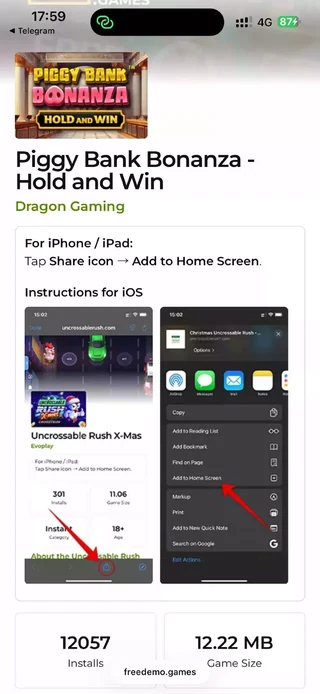
After that the casino icon appears on your home screen — it launches like an app, opening fullscreen with no browser address bar. The experience is identical to a native app.
Original vs fake: what the difference looks like
So you know exactly what protects your money — here's a visual comparison of the original slot and a typical scam "game":
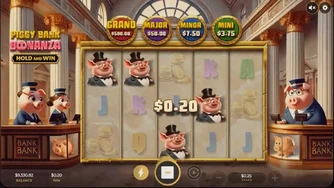
$9,847
Watch 50 video ads to withdraw
Warning: watch out for scam schemes!
APK files and apps under the name "Piggy Bank Bonanza" that have nothing to do with Dragon Gaming are actively spreading online. The scam scheme is always the same: the game promises real payouts, quickly "credits" large sums, then demands you watch ads or reach an unrealistic withdrawal threshold.
Signs of a fake app:
- Offers you an APK download directly from a site or via Telegram — official slots aren't distributed that way
- Promises money for watching ads — a real casino pays for wins, not for the attention you give ads
- An unrealistic "earned" balance ($5,000–$10,000 in a few minutes) with no real RNG
- The withdrawal threshold keeps moving — you hit $100, now you need $200; you hit $200, a new threshold appears
- No regulator license (MGA, Curaçao, UKGC) — neither in the interface nor in the app description
- The store developer doesn't match Dragon Gaming — typical names: STORE TAFO, Lucky Fun Games and the like
Top casinos with the official Piggy Bank Bonanza
Only licensed platforms with Dragon Gaming in their catalogue — available on Android and iOS via the browser or a branded app:
FAQ — Mobile version questions